MCP/external agent tools
Last updated: October 26, 2026
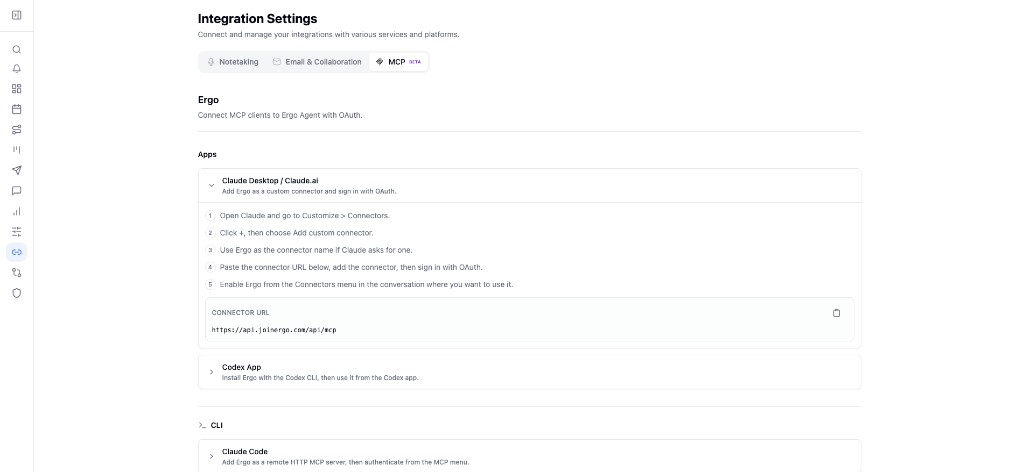
Use this page when you want to connect an AI client such as Claude Desktop, Claude.ai, Claude Code, Codex, or Cursor to Ergo. MCP lets that client ask Ergo questions and read meeting transcripts as the signed-in Ergo user.
There is no API key. Copy the connection details from Integrations → MCP in the dashboard, or use this URL:
https://api.joinergo.com/api/mcp
Who can use this
Admins and technical operators setting up external agent access.
Users connecting their own Ergo account to an approved MCP client.
Spectator users can connect, but they can only read meeting transcripts. They cannot use Ask Ergo.
Before you start
Sign in to Ergo as the user whose workspace context the client should use. The connection is that user in that organization, not an org-wide credential.
Use a Core seat if you need Ask Ergo. Spectator seats can only query meeting transcripts.
Connect a client
OAuth opens in the browser. Authorize Ergo, then keep the token in the client. Re-authenticate in the client if you get a 401.
Claude Desktop / Claude.ai
Open Claude and go to Customize → Connectors.
Click +, then Add custom connector.
Name it
Ergoif Claude asks for a name.Paste
https://api.joinergo.com/api/mcp, add the connector, and sign in with OAuth.Enable Ergo from the Connectors menu in the conversation where you want to use it.
Claude Code
claude mcp add --transport http --scope user ergo 'https://api.joinergo.com/api/mcp'Open Claude Code, run /mcp, select Ergo, and finish OAuth.
Codex (app or CLI)
codex mcp add ergo --url 'https://api.joinergo.com/api/mcp'
codex mcp login ergo
Complete the OAuth window. In the Codex app, restart if Ergo does not appear. In the CLI, run /mcp if login does not start on its own.
Other MCP clients
Any client that supports a remote HTTP MCP server and OAuth can use the same URL. Cursor is one example. Copy the URL from Integrations → MCP rather than constructing it.
What the client can do
MCP does not widen access. After OAuth, every tool call runs as the signed-in user, with the same data that user can already see in the Ergo dashboard.
Core seat:
ask_ergo_agent,get_ergo_agent_result, andquery_meeting_transcripts.Spectator seat:
query_meeting_transcriptsonly. A Spectator client that calls Ask Ergo is rejected.
Ask Ergo
Use this to ask about pipeline, a deal, or an account from that user's workspace: CRM records, meetings, notes, email, pipeline, next steps, and account research they can already open.
ask_ergo_agent returns immediately with status queued. It does not return the answer. Wait at least 10 seconds, then call get_ergo_agent_result with that runId until the status is answered, blocked, or error. Keep threadId to continue the same conversation. You cannot poll someone else's run.
Meeting transcripts
Use query_meeting_transcripts when you want the words from a meeting, not an Ergo-written summary.
Discover meetings by title or attendee name/email, with optional start and end dates. This search does not match words inside the transcript.
Retrieve transcript pages with the returned
meetingIduntilhasMoreis false.
Transcript access follows the Meetings page: owner, attendee, team admin, organization-wide access, and custom grants. A meeting visible only because it sits in a shared folder may not appear. Organization retention can block transcript text. Unknown or inaccessible ids do not confirm that the meeting exists.
What to expect
The session is the signed-in Ergo user. Switching Ergo users means reconnecting in the client.
Connecting a client does not change meeting, CRM, or pipeline visibility.
The quota is 120 requests per 60 seconds per connected user. A
429includes a wait time; wait at least that long.If the user or organization is inactive, the server returns
403.When reporting a failed request, include the
X-Request-IDfrom the response.
Common issues
OAuth was completed with the wrong Ergo user.
A Spectator client tries to use Ask Ergo and is rejected.
The client cached an old MCP configuration and needs reconnect.
A
401after idle use; re-authenticate in the client.A meeting does not appear because the user can see it only through a shared folder, or retention blocks the transcript.